> For the complete documentation index, see [llms.txt](https://faq.declarecripto.com.br/llms.txt). Markdown versions of documentation pages are available by appending `.md` to page URLs; this page is available as [Markdown](https://faq.declarecripto.com.br/tutoriais-sobre-extracao-de-dados-e-criptomoedas/corretoras-api-e-extratos/binance/como-criar-uma-chave-api-na-binance-opcional.md).
# Como criar uma Chave API na Binance? (Opcional)
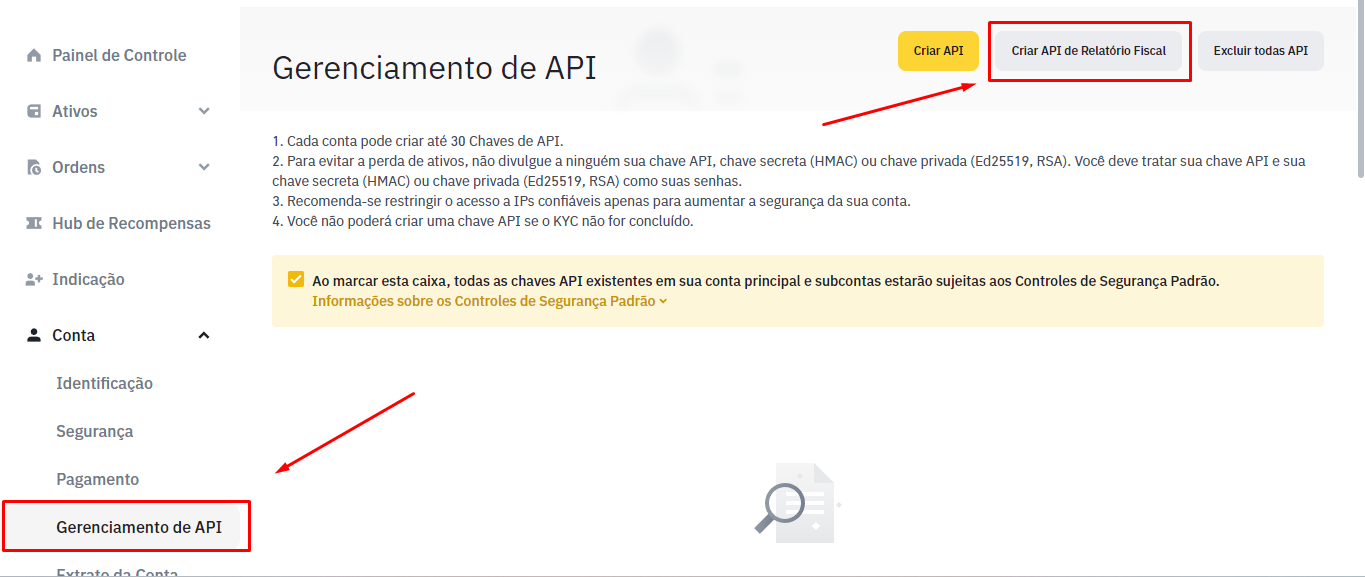
1\. Faça o login em sua conta da Binance e clique em **\[Conta]** - **\[Gerenciamento de API]**.
2\. Clique em **\[Criar API de Relatório Fiscal]**.
3\. Você receberá sua API exclusiva e Chave Secreta para o Relatório Fiscal. Você deve copiar e colar as chaves API e Secret dentro da nossa plataforma, na opção "API de Corretora".
{% embed url="" %}
**Cuidado:** A chave Secret aparece apenas uma vez! Se você sair da página sem copiar a chave, terá que apagar a API e criar outra.
{% endembed %}
**Caso esteja usando o aplicativo da Binance para celular, lembre-se de ativar a versão "Pro", pois a versão "Lite" não possuí a opção "Gerenciamento de API".**
**Utilize as imagens abaixo para encontrar a opção "Gerenciamento de API" no aplicativo.**


Acesse mais informações abaixo.
{% embed url="" %}