> For the complete documentation index, see [llms.txt](https://faq.declarecripto.com.br/llms.txt). Markdown versions of documentation pages are available by appending `.md` to page URLs; this page is available as [Markdown](https://faq.declarecripto.com.br/tutoriais-sobre-extracao-de-dados-e-criptomoedas/corretoras-api-e-extratos/bitgo.md).
# Bitgo
## Como emitir meu Histórico de Transações na BITGO?
1. Acesse sua conta na [BitGo](https://app.bitgo.com/) e clique no menu de nove pontos 𓃑 no canto **superior direito** da tela, e clique em **\[Reports]**.
2. Na página "Reports", na aba "Transactions", clique em **\[Transactions]**.
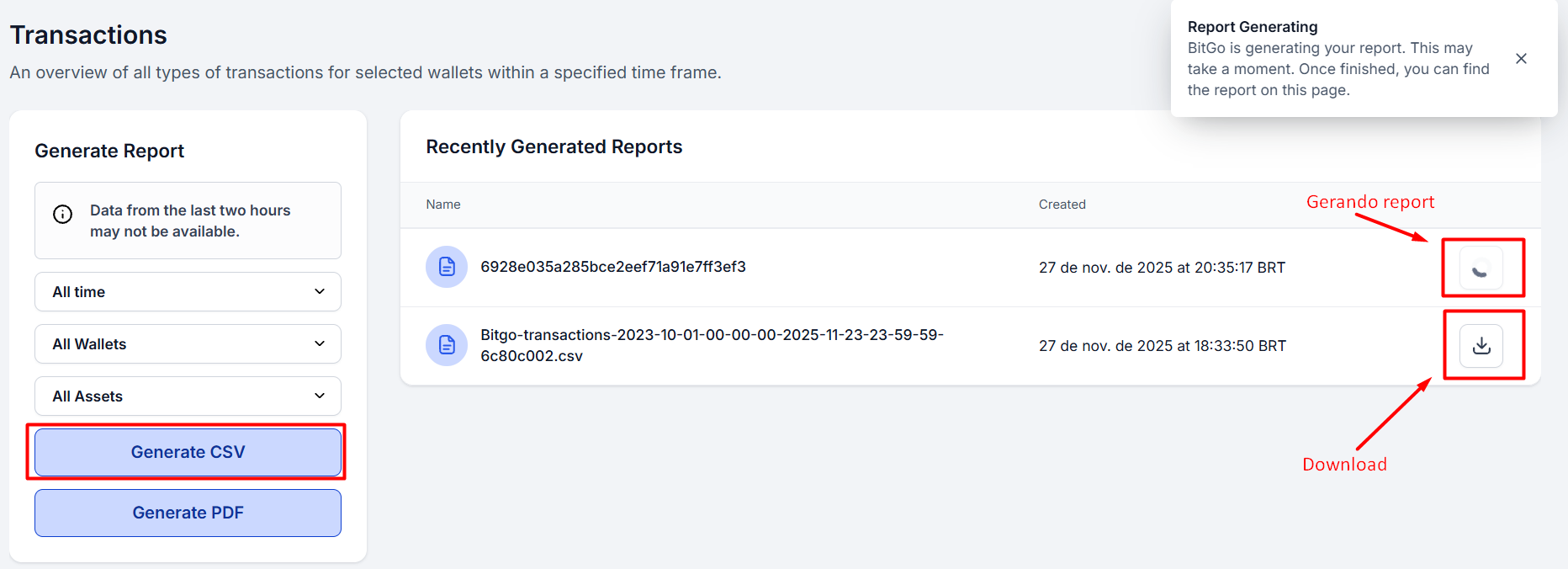
3. Na seção "**Generate Report**" selecione:
1. All time
2. All Wallets
3. All Assets
Depois, clique em **\[Generate CSV]** e aguarde alguns instantes.
4. Uma lista com as suas exportações vai aparecer a direita. Assim que disponível, clique no botão de **\[Download]**.
5. **IMPORTANTE**: Depois repita o processo para os demais **3 arquivos**:
1. **Transactions**
2. **Address Level Transaction Details**
3. **Transaction Details**