> For the complete documentation index, see [llms.txt](https://faq.declarecripto.com.br/llms.txt). Markdown versions of documentation pages are available by appending `.md` to page URLs; this page is available as [Markdown](https://faq.declarecripto.com.br/tutoriais-sobre-extracao-de-dados-e-criptomoedas/corretoras-api-e-extratos/bybit/como-criar-uma-chave-api-na-bybit.md).

# Como criar uma chave API na ByBit?

1. Faça o login em sua conta da ByBit. No canto superior direito da tela, clique no **\[Ícone Perfil] - \[API]** *(imagem abaixo)*

<figure><img src="https://1904788593-files.gitbook.io/~/files/v0/b/gitbook-x-prod.appspot.com/o/spaces%2FZMtsnqtDvZckvUb1GlUe%2Fuploads%2FDbzXZPqPja5zTpReFvQe%2FAPI%20ByBit%201.png?alt=media&amp;token=156ffb16-e1f4-400c-826c-0a0a31c589bd" alt=""><figcaption></figcaption></figure>

2. Na aba *"Gerenciamento de API"* clque em **\[Criar nova chave] -> \[Chave API gerada por sistema].**

<figure><img src="https://1904788593-files.gitbook.io/~/files/v0/b/gitbook-x-prod.appspot.com/o/spaces%2FZMtsnqtDvZckvUb1GlUe%2Fuploads%2FYBslRw5owUIUpcbuaHP2%2FAPI%20ByBit%202.png?alt=media&amp;token=24ec96c3-065f-49e0-88de-5c805e7642c0" alt=""><figcaption></figcaption></figure>

<figure><img src="https://1904788593-files.gitbook.io/~/files/v0/b/gitbook-x-prod.appspot.com/o/spaces%2FZMtsnqtDvZckvUb1GlUe%2Fuploads%2Fglc9UWRbLeuD9BzmplI2%2Fimage.png?alt=media&amp;token=493d23ab-00b3-4e0a-bf11-60bf2221baba" alt=""><figcaption></figcaption></figure>

3. Na sessão *"Uso de chave API"* marque a opção **\[Transação API]**, em seguida, na sessão *"Permissões de chaves API"* marque as opções **\[Somente Leitura]** e **\[Sem restrição de IP]**\
   Nos tipos de permissões, selecione **\[Todos]** e clique em **\[Enviar]**

<figure><img src="https://1904788593-files.gitbook.io/~/files/v0/b/gitbook-x-prod.appspot.com/o/spaces%2FZMtsnqtDvZckvUb1GlUe%2Fuploads%2Fcb0O3O20qtfPLEYX3cbV%2FAPI%20ByBit%203.png?alt=media&amp;token=ea3f9ffb-173f-4bc7-8a79-df0731bc8157" alt=""><figcaption></figcaption></figure>

<figure><img src="https://1904788593-files.gitbook.io/~/files/v0/b/gitbook-x-prod.appspot.com/o/spaces%2FZMtsnqtDvZckvUb1GlUe%2Fuploads%2FXfq7xiljSyhh7RzLofOc%2FAPI%20ByBit%204.png?alt=media&amp;token=872c6157-6017-4805-9d96-1e85dd28f927" alt=""><figcaption></figcaption></figure>

4. Sua chave API foi criada! Agora é só copiar suas Chave API e Chave Secret, e enviar cada uma delas na plataforma Declare Cripto!\
   **IMPORTANTE:** *Lembre de copiar sua Chave Secret antes de fechar essa tela, pois ela não aparecerá novamente!*

<figure><img src="https://1904788593-files.gitbook.io/~/files/v0/b/gitbook-x-prod.appspot.com/o/spaces%2FZMtsnqtDvZckvUb1GlUe%2Fuploads%2FdH66R5j1HF5GPfIuWqYj%2FAPI%20ByBit%205.png?alt=media&amp;token=c8c70900-e683-4612-afab-97481ec3073c" alt=""><figcaption></figcaption></figure>

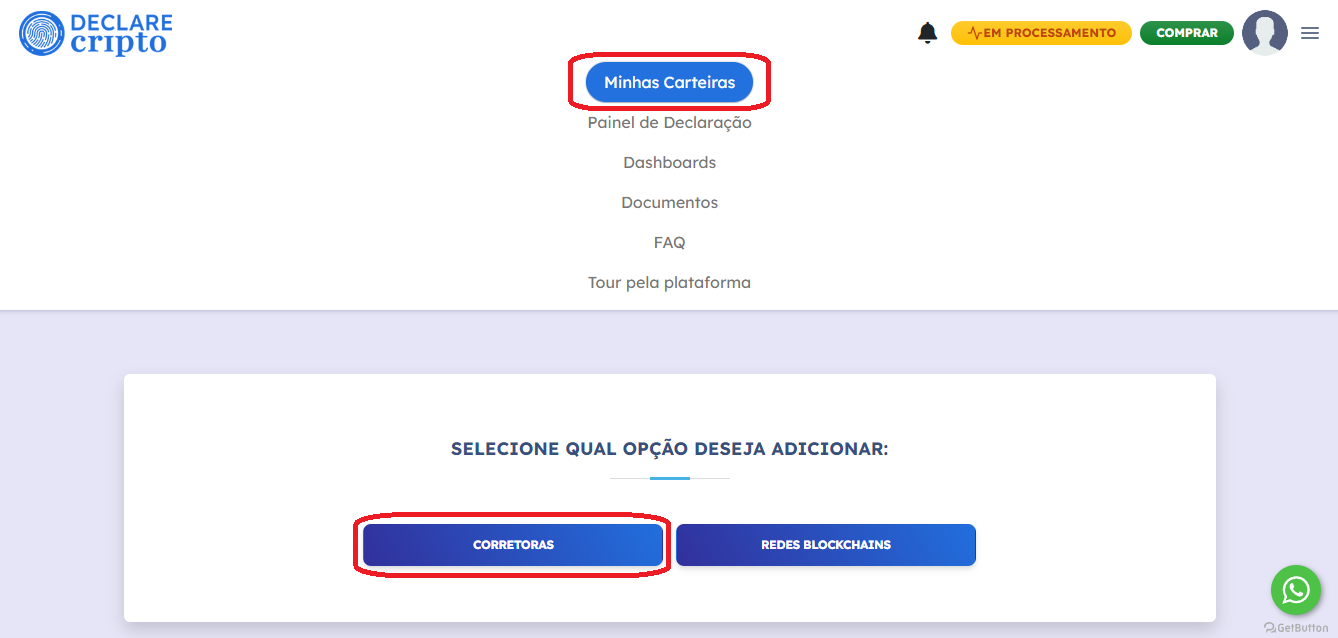
5. Para cadastrar sua API na nossa plataforma, faça login na sua conta e selecione as seções **\[Minhas Carteiras] - \[Corretoras]**

<figure><img src="https://1904788593-files.gitbook.io/~/files/v0/b/gitbook-x-prod.appspot.com/o/spaces%2FZMtsnqtDvZckvUb1GlUe%2Fuploads%2FjXypnnbIaineR1EIT3tW%2FAPI%20Crypto.com%203.5.png?alt=media&amp;token=e459387f-7bdb-4e67-a209-46d3ab376618" alt=""><figcaption></figcaption></figure>

6. Selecione a corretora **ByBit**.

<figure><img src="https://1904788593-files.gitbook.io/~/files/v0/b/gitbook-x-prod.appspot.com/o/spaces%2FZMtsnqtDvZckvUb1GlUe%2Fuploads%2FbFCzoWKvQ9nkY5VxIsHi%2FAPI%20ByBit%206.png?alt=media&amp;token=3be43bc3-791e-48e2-a93a-3d691a5f3c9b" alt=""><figcaption></figcaption></figure>

7. Selecione a aba **\[Chave]** e informe sua Chave API e Chave Secret na plataforma e clique em **\[Salvar]**

<figure><img src="https://1904788593-files.gitbook.io/~/files/v0/b/gitbook-x-prod.appspot.com/o/spaces%2FZMtsnqtDvZckvUb1GlUe%2Fuploads%2FpvUqvSyGetqMDP2dS9VR%2FAPI%20ByBit%207.png?alt=media&amp;token=8d9179ef-bc5c-4a07-9f28-68aeb7a573f1" alt=""><figcaption></figcaption></figure>