> For the complete documentation index, see [llms.txt](https://faq.declarecripto.com.br/llms.txt). Markdown versions of documentation pages are available by appending `.md` to page URLs; this page is available as [Markdown](https://faq.declarecripto.com.br/tutoriais-sobre-extracao-de-dados-e-criptomoedas/corretoras-api-e-extratos/coinbase/como-emitir-meu-historico-de-transacoes-na-coinbase-obrigatorio.md).
# Como emitir meu histórico de transações na Coinbase (Obrigatório)
**IMPORTANTE:** Verifique se a moeda "base" da sua corretora está em Real (BRL), para que o extrato seja gerado em BRL.\
Você pode alterar a moeda base no menu "Preferências":
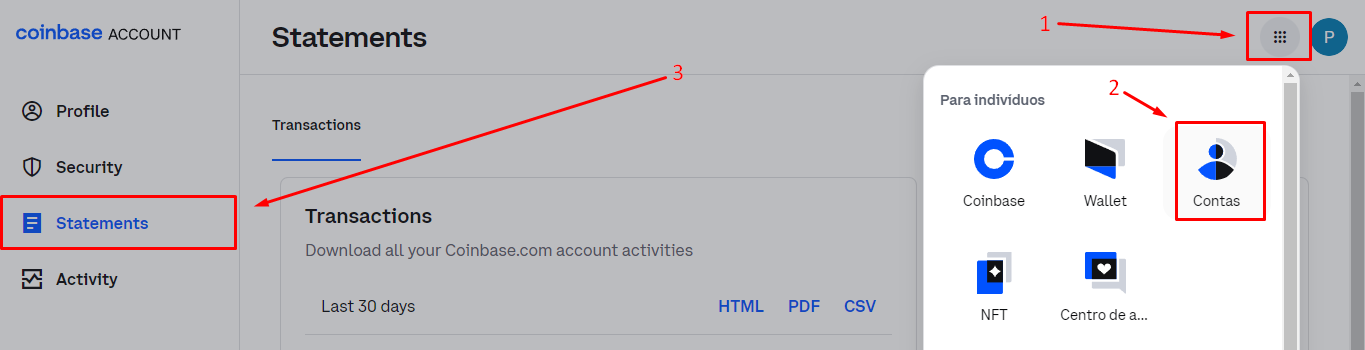
1. Faça login em sua conta da Coinbase e selecione o ícone "menu" - item 1.
2. No menu, clique em **\[Contas] -> \[Statements]**.
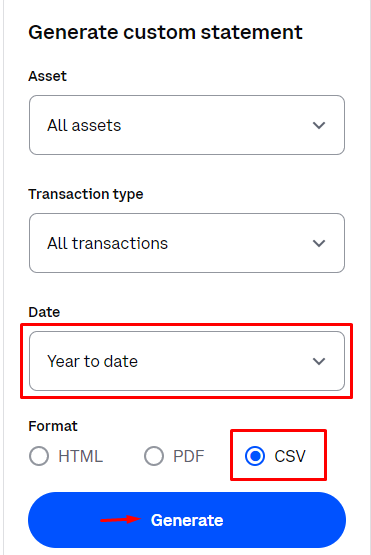
3. Na lateral direita da tela, você encontra as opções para selecionar um período para o arquivo.
4. Marque a opção **\[CSV]** e clique em **\[Generate]**.