> For the complete documentation index, see [llms.txt](https://faq.declarecripto.com.br/llms.txt). Markdown versions of documentation pages are available by appending `.md` to page URLs; this page is available as [Markdown](https://faq.declarecripto.com.br/tutoriais-sobre-extracao-de-dados-e-criptomoedas/corretoras-api-e-extratos/foxbit/como-emitir-meu-historico-de-transacoes-na-foxbit-obrigatorio.md).
# Como emitir meu histórico de transações na FoxBit? (Obrigatório)
Na Foxbit, apenas o histórico mais recente fica disponível na plataforma, caso tenha operações mais antigas, solicite o extrato através do suporte da Foxbit, conforme indicado no final dessa página.
Para operações recentes:
1. Faça login em sua conta da FoxBit e acesse a aba **\[Meu Histórico]**.
2. No final do seu histórico de transações, clique em **\[Download do Histórico]**.
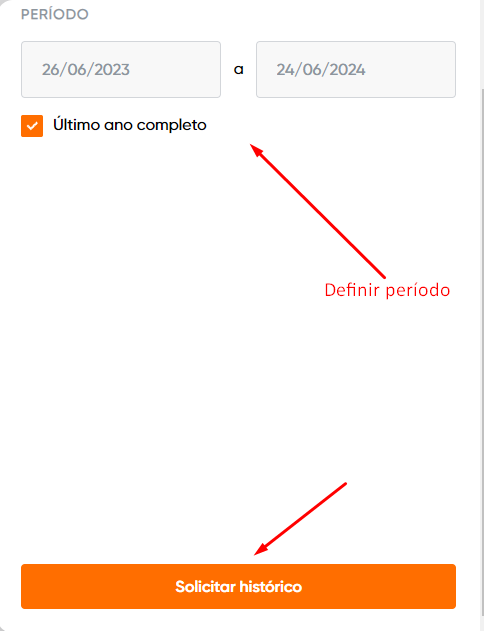
3. Selecione o período, e clique na opção 'Solicitar Histórico".
4. Em até 2 horas, você vai receber um e-mail com o botão para fazer o download do extrato em CSV (será necessário logar novamente na FoxBit).
5. Depois, é só enviar o arquivo CSV na plataforma Declare Cripto, através da seção "Minhas Carteiras -> Corretoras -> FoxBit -> Arquivo".
**Para operações mais antigas:**
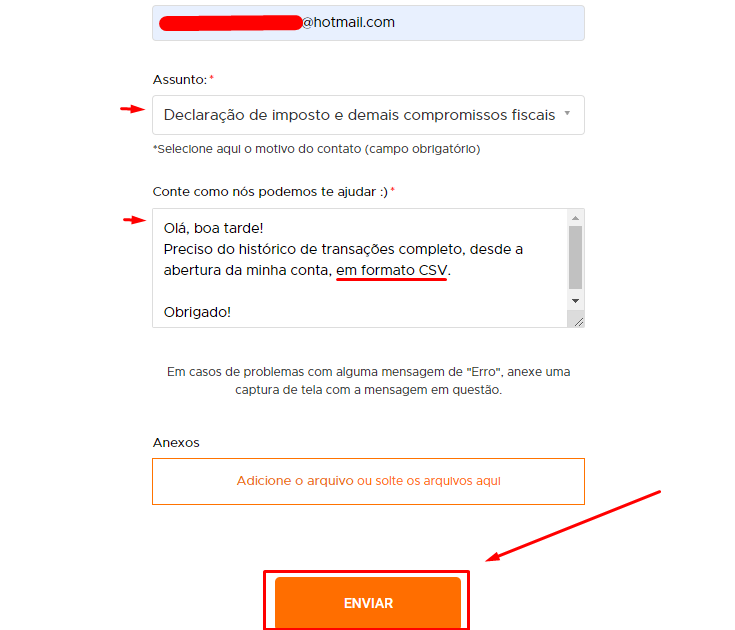
### ***Você deve solicitar o extrato através desse link:***
*"Preciso do histórico de transações completo, desde a abertura da minha conta, em formato CSV."*