> For the complete documentation index, see [llms.txt](https://faq.declarecripto.com.br/llms.txt). Markdown versions of documentation pages are available by appending `.md` to page URLs; this page is available as [Markdown](https://faq.declarecripto.com.br/tutoriais-sobre-extracao-de-dados-e-criptomoedas/corretoras-api-e-extratos/okx-okex/como-registrar-minhas-transacoes-na-okx-wallet-web3-wallet.md).
# Como registrar minhas transações na OKX Wallet (Web3 wallet)?
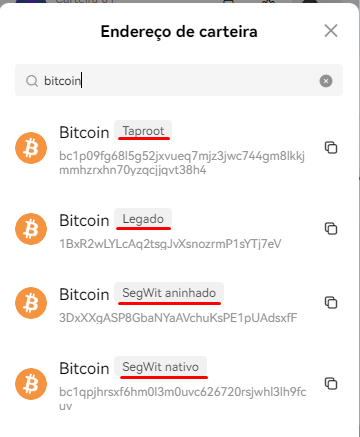
1. Acesse a sua OKX Wallet e clique no ícone de **\[Copiar ❐]**.
2. Na lista com todos os seus endereços de wallet, copie o endereço da rede blockchain que você utiliza para cadastrar na plataforma Declare Cripto.
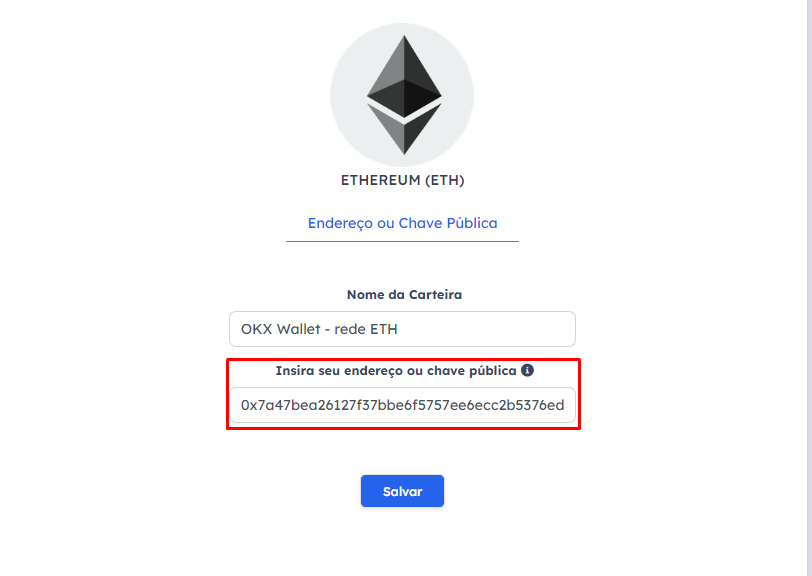
3. Depois de copiado o endereço, acesse a plataforma Declare Cripto na aba "Minhas Carteiras" e selecione a opção "Redes Blockchain" para cadastrar a chave chave pública da sua wallet.
*OBS: Algumas rede blockchain, como a rede Bitcoin, possuem múltiplos endereços, devido à novas versões da mesma rede. Verifiquei se o endereço cadastrado possui transações, através do **Scan** ou **Explorer** da rede blockchain que você utiliza.*